Choose a Christmas movie that fits tonight
Check the running time, content and language or accessibility features your family needs before everyone settles down.

Before choosing a Christmas movie, start with the evening you have. A familiar film may run past bedtime, while another copy may lack the captions someone needs. Check one or two candidates rather than searching until the evening is almost over.
Leave enough time to watch comfortably
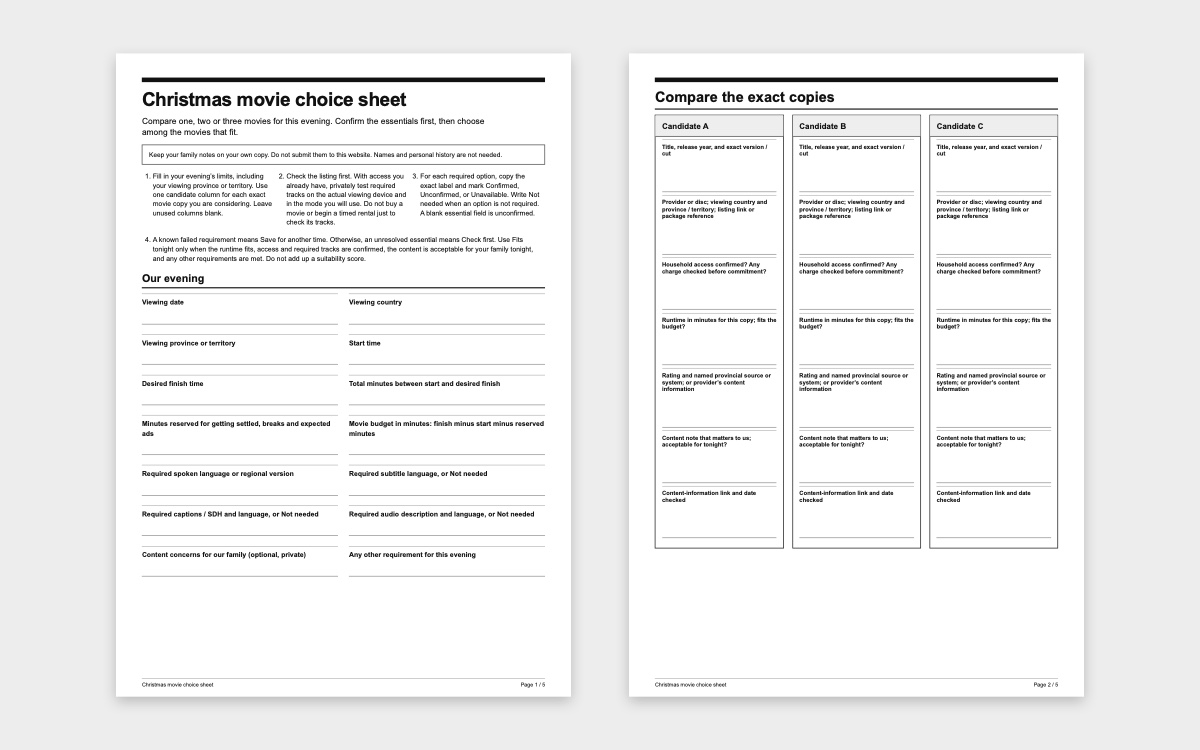
Decide when you can start and when you want to finish. Allow for getting settled and any breaks or ads, then compare the remaining time with the running time of the exact version you can watch. For example, a 105-minute evening with 15 minutes for settling and breaks leaves 90 minutes for a movie. Those figures are a fictional planning example, not a screen-time recommendation.
Check that your household can actually play that copy tonight. A search result does not confirm that it is included in your subscription. If there is a charge, confirm it before agreeing to watch.
Read the content information for that version
Read the content information on the copy you will use. Canadian theatrical classifications are provincial or territorial, as MPA Canada explains; do not assume one nationwide streaming rating. A regional classification search can add context for a matching release. Match the title, release year and version. If you only have the provider’s content information, use that without inventing an age rating.
Consider the subjects that matter to your child, such as separation, loss or frightening scenes. An age rating helps you decide; it cannot promise that every child will be comfortable. Read fuller content advice privately if you want to avoid spoiling the story for everyone.
Check the language and any essential accessibility feature
Does someone need a particular spoken language, subtitles, captions or audio description? Check those separately. Apple’s accessibility guide explains the labels: CC and SDH include information beyond dialogue, while AD describes visual action aloud. Ordinary subtitles are not always a substitute for the feature a viewer needs.
If you already have access, try a short section on the device and copy you will use together. A translated menu does not prove that the soundtrack is in that language, and a phone check may not settle what is available on the TV or in a download. Ask the provider if an essential option remains unclear; do not pay just to discover whether it exists.
Choose from the options that work
The optional movie choice sheet has room for two titles and the checks above. Choose only after the running time, content, access and needed features fit. If none does, try a familiar shorter option or another activity.
Before starting, agree that anyone can ask to pause or stop. Picking a movie does not mean everyone has to finish it.